Artifacts
The answer does not have to arrive as a wall of text. An artifact is the same work as a thing you can open, change and send.
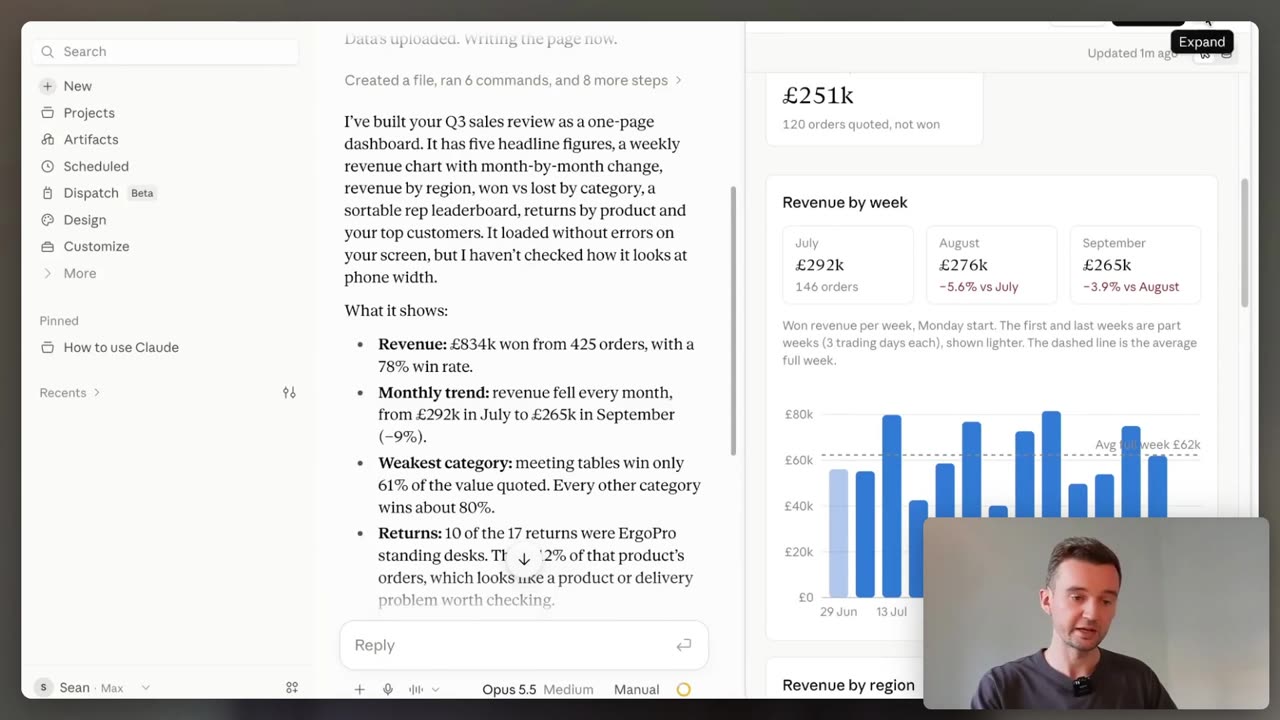
“I love artifacts. I just think the name is so bad.” Ignore the word. It means a finished piece of work, in its own window, that you would put in front of someone.
The Artifacts building block from Claude 101, in depth. New to Claude? Start there: Claude 101 →
Ask
Get a thing, not twenty pages
Claude makes one on its own when the work stands alone and you are likely to want it later.
If it comes back as text instead, just say “make this an artifact.”
- What would you actually put in front of someone?
- Will you come back to this, or read it once?
- A one-pager, a dashboard, a deck or a document?
Ask for one in any conversation, including in Claude Code. Artifacts are on every plan, Free included, with Code execution and file creation switched on in Settings › Capabilities.
Edit
Change it without starting again
Tell Claude what to change, or change it yourself.
Every update saves a new version, so the one you liked is still there.
- Which line is wrong, and can you point straight at it?
- Was the last version better?
- Does it need fixing, or describing again?
In a document, highlight the text and click “Edit with Claude”, then say what you want, so you never have to explain which bit you mean. If something breaks, use “Try fixing with Claude”.
Make one from something you already have
A long report is the easiest win. Do not start from a blank page.
- 1
Drop the document in. A report, a policy, a spreadsheet, a folder of notes.
- 2
Ask for an artifact by name. “Turn this into a one-page interactive artifact.”
- 3
Say who it is for. A colleague skimming for two minutes reads nothing like you do.
- 4
Change one thing, then share it. Ask for a single fix, check the version, click Share.
In the new Claude experience, everything you make is saved to the Artifacts tab in the sidebar. On the older chat experience, open the artifact and click Publish first.
What you can ask for
Underneath they are documents, web pages, diagrams and small apps. You do not need to know which.
A one-pager
from something long- A report or a policy, made readable.
- Graphs and tables where they earn it.
A dashboard
you come back to- Trackers, comparisons, reference pages.
- On paid plans, on web and desktop, it can pull from your connected apps.
A deck, doc or design
beta, paid plans- Claude Slides, Claude Docs, Claude Design.
- Present in Claude, or export to PowerPoint or PDF.
On the phone, ask for a design, deck or doc and read the result in the Artifacts tab. Starting from a template, editing, and changing who can see it are web and desktop.
- What it is: finished work in its own window, not a wall of text.
- Ask: if you get text back, say “make this an artifact.”
- Edit: tell Claude, or highlight and edit in place. Versions are kept.
- Share: it starts private to you; a link gives view or edit.
This week: take the longest document on your desk and ask for a one-page artifact.
Give it the knowledge to build from: Projects → See where the heavier work runs: Chat vs Cowork →
Do it with someone. Everything here is free and you can run it alone. If you would rather work through it with me, one to one, book a free 30-minute chat or see lessons and prices. No pitch.